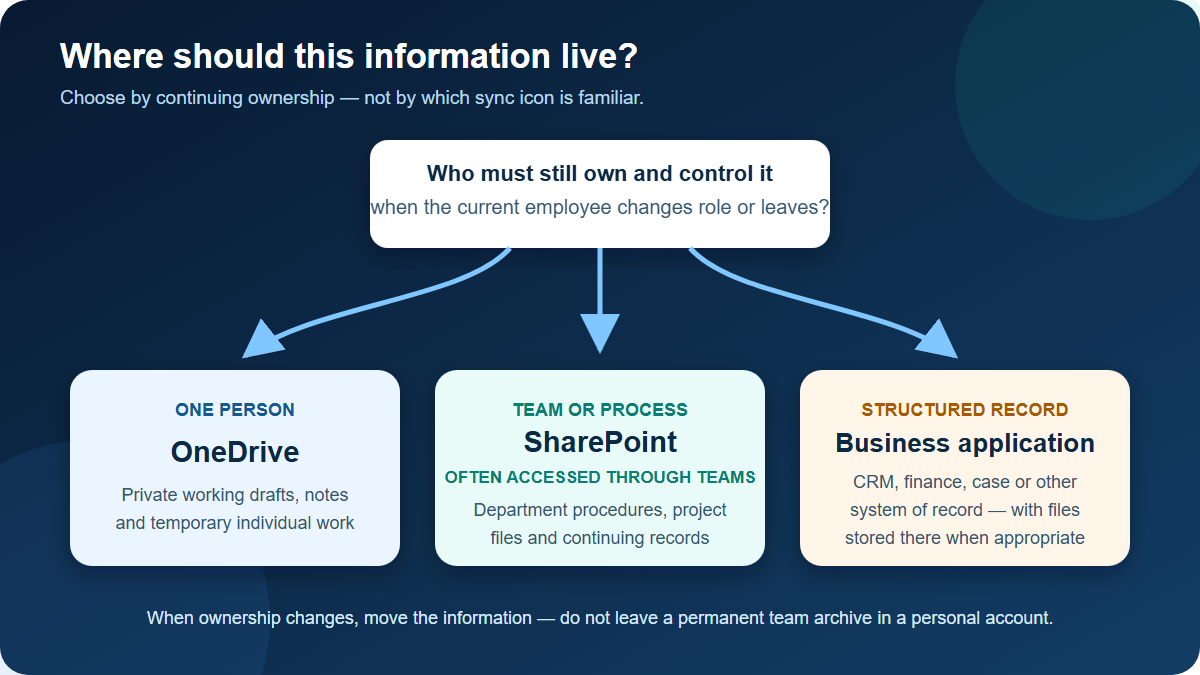
Use OneDrive for an individual’s working files. Use SharePoint, including the SharePoint sites behind Microsoft Teams, for information that a team, department or continuing business process owns.
The simplest test is: if this employee left tomorrow, would the organisation still need these files in the same organised place? If yes, the long-term home should normally be SharePoint or the appropriate business system, not that employee’s OneDrive.
This guidance is for organisations using Microsoft 365 for ordinary documents and collaboration. It changes when a regulated record, transaction or customer dataset belongs in a specialist system such as a finance platform, CRM, document-management system or case-management application.
What Microsoft confirms
Microsoft describes SharePoint and OneDrive as cloud services for sharing and managing organisational content. It also confirms that files stored in Microsoft Teams are stored in SharePoint sites. A team’s standard channels use its parent SharePoint site; each private or shared channel has its own SharePoint site, accessible only to that channel’s members.
Those product facts do not decide where every file belongs. The ownership rule below is Theo Tech’s operational judgement: choose the home that matches who must control, retain and recover the information.
Choose by ownership, not by the sync icon
| Situation | Better starting point | Why |
|---|---|---|
| Personal notes and an early working draft | OneDrive | One person still owns and manages the work |
| A proposal prepared privately before team review | OneDrive, then move to SharePoint | Ownership changes when it becomes a shared team record |
| Department procedures, templates and policies | SharePoint | The function must keep them when individual staff change |
| Files used by a project team | SharePoint, often accessed through Teams | Membership, ownership and collaboration can be managed around the team |
| A file shared briefly with one colleague | OneDrive can be reasonable | The individual owner remains clear and the sharing is temporary |
| Customer, transaction or case records used by several people | The relevant business system, or SharePoint if files truly are the record | Structured data, audit and workflow requirements may exceed either file store |
Both OneDrive and SharePoint support sharing, synchronisation and co-authoring. A shared OneDrive folder can therefore appear to work perfectly while still being in the wrong organisational home.
Why a shared department should not live in one person’s OneDrive
A folder can be shared from an employee’s OneDrive, but the account remains part of that person’s lifecycle. When the employee leaves, Microsoft 365 administrators have recovery and delegation controls, but those controls are a safety net rather than a durable information design.
Microsoft’s current leaver documentation says that deleting a user starts a OneDrive clean-up process. The deleted user remains recoverable in Microsoft 365 for 30 days, and the default OneDrive retention period is also 30 days, although administrators can change the OneDrive retention setting. Automatic access for the user’s manager depends on delegation being enabled and on a manager or secondary owner being configured.
Do not build a department around the assumption that somebody will remember to rescue the right folders during that window. Persistent team information belongs in a team-owned location before the leaver event occurs.
Permissions: keep the model understandable
For ordinary team information, manage access through a Team or SharePoint site’s owners, members and visitors rather than accumulating individual sharing links. Use a separate restricted site or Team when a whole information set needs different membership, such as finance or HR.
Avoid repeatedly breaking permissions at individual file and folder level. Exceptions become difficult to explain, test and remove. Also remember that private and shared Teams channels use separate SharePoint sites; check the actual channel membership and site rather than assuming every file follows the parent Team.
External sharing needs an explicit rule: who can invite a guest, what can be shared, how long access should last and who reviews it. Moving a file to SharePoint does not by itself make the permission correct.
Three worked examples
Finance
A finance manager’s rough cash-flow calculation can begin in OneDrive. Once it becomes the forecast reviewed by directors, move the approved working set to a restricted finance SharePoint site. Transactions and the accounting ledger remain in the finance system, not in a spreadsheet library presented as the system of record.
Sales
A salesperson’s early notes for a proposal can stay in OneDrive while they are private working material. The final proposal, reusable collateral and handover documents should move to the sales team’s SharePoint site. Customer activities, deal stages and contact records belong in the CRM where the sales process can continue without that salesperson.
Projects
A project team should store its plans, meeting records and deliverables in the SharePoint site connected to its Team. A project member can keep temporary calculations in OneDrive, but the agreed plan and final outputs should be moved into the team’s controlled library. If a private channel is used for commercial or personnel matters, verify the membership and the separate SharePoint site it creates.
Before moving files
- Group information by business owner and continuing purpose.
- Decide whether the record belongs in a specialist business system rather than a file library.
- Identify who must read, edit, administer and approve external access.
- Remove obsolete duplicates instead of migrating everything.
- Check file names, path lengths, unsupported content, macros and application dependencies.
- Decide the required retention, backup, recovery and leaver process.
- Design a small number of understandable sites and libraries.
- Pilot one bounded information set and confirm permissions, sync, search and restore procedures.
- Move the next area only after the pilot owner signs off.
Common mistakes
- Treating OneDrive as the new company file server.
- Creating a separate Team for every short conversation.
- Putting everything in one universal SharePoint site and granting everybody access.
- Breaking inheritance repeatedly until nobody can explain who has access.
- Synchronising large libraries to every laptop without a practical need.
- Assuming Microsoft 365 removes the need for retention and backup decisions.
- Migrating duplicate, obsolete and trivial data without an accountable owner.
Practical recommendation
Start with ownership and continuity. OneDrive is an individual’s work area; SharePoint is the organisation’s shared information platform; Teams is often the interface through which people reach files stored in SharePoint. Move information when its ownership changes, and use a line-of-business application when documents are not the right system of record.
Theo Tech can help design and migrate a workable Microsoft 365 file structure, including permissions and Teams-connected sites. Coordinate the file plan with user onboarding and offboarding and backup and business continuity rather than treating migration as an isolated copy job. If the current structure has unclear ownership or access, ask Theo Tech to review it.
Research reviewed 25 August 2026. Microsoft can change OneDrive lifecycle, retention and Teams/SharePoint behaviour; recheck the linked Microsoft documentation before a migration or leaver process.
Primary sources
- Introduction to SharePoint and OneDrive in Microsoft 365 for administrators, Microsoft Learn; checked 25 August 2026.
- Overview of Teams and SharePoint integration, Microsoft Learn; checked 25 August 2026.
- OneDrive retention and deletion, Microsoft Learn; checked 25 August 2026.